Integrating a Portlet into AEM on JBoss Application Server
Deploying a portlet into AEM is very simple, but you need to add a jar into a shared location of JBoss Application Server which is the tricky part.
CQ Portlet Component
– After unwrapping AEM jar file, you will see “cq-portlet-components.zip” file at “/crx-quickstart/opt/portal” location. The zip file contains a portlet component with required jar files. Copy the zip file to some location of your machine.
– Unzip “cq-portlet-components.zip” and copy “cq-portlet-director-sharedlibs-5.4.2.jar” from \libs\portal\director to your local file system.
Installing AEM on JBoss AS
– Deploy AEM war file in JBoss Application Server. Please follow this post https://rmengji.wordpress.com/2014/06/05/installing-aem-on-jboss-application-server/
for installing AEM on JBoss AS.
Installing Portlet component on AEM application
– Go to AEM (installed on the JBoss server) package manager and install “cq-portlet-components.zip”.
Configuring Shared library on Jboss
– You have to copy “cq-portlet-director-sharedlibs-5.4.2.jar” into a shared location on JBoss server so that other applications can access it.
– You can create a shared library on JBoss using a module.
– Go to “<JBoss Installation Directory>\modules” and create a folder structure as per your requirement. E.g., “<JBoss Installation Directory>\modules\com\rmengji\shredlibrary\main”. Please note that main directory is mandatory at the end of your folder structure.
– Copy “cq-portlet-director-sharedlibs-5.4.2.jar” into the main folder of the structure you have just created. E.g., “<JBoss Installation Directory>\modules\com\rmengji\shredlibrary\main”.
– Create a file with name “module.xml” in the main folder and include the following xml code:
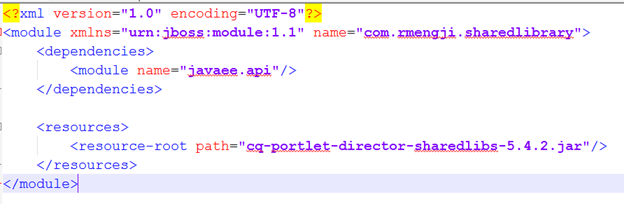
– Go to “standalone.xml” file in “<JBoss Installation Directory>\standalone\configuration\” and edit the following “subsystem” tag with the following code:

– Restart the JBoss Application Server.
Deploy a Portlet Component war on to the JBoss server
– add the following xml code snippet into the web.xml of the the portlet component.
<servlet>
<servlet-name>slingportal</servlet-name>
<servlet-class>org.apache.sling.portal.container.api.ContainerServlet</servlet-class>
<load-on-startup>1</load-on-startup>
</servlet>
<servlet-mapping>
<servlet-name>slingportal</servlet-name>
<url-pattern>/SlingPortletInvoker</url-pattern>
</servlet-mapping>
If you’ve received a portlet as a war file, then import the war into eclipse, edit the web.xml and export it as war file.
Using the Portlet component on AEM page
– Open your AEM page, go to design mode and add “Portlet” component place under “General” component group.
– Drag and Drop the portlet component on to the parsys.
– Open the portlet component and select the portlet you have just deployed on the JBoss application server.
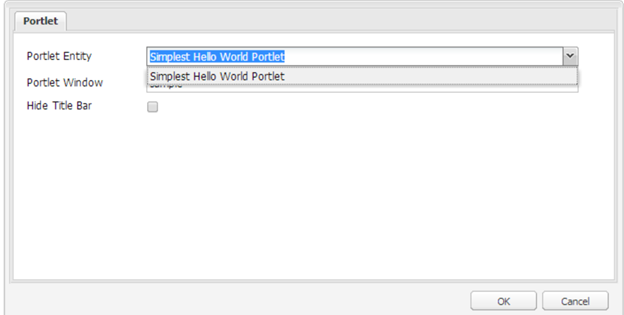
– Click “OK” and then you should see the ouput of the portlet component onto your AEM page.

 Rahul Mengji
Leave a reply to Rama Cancel reply